

Cache Management
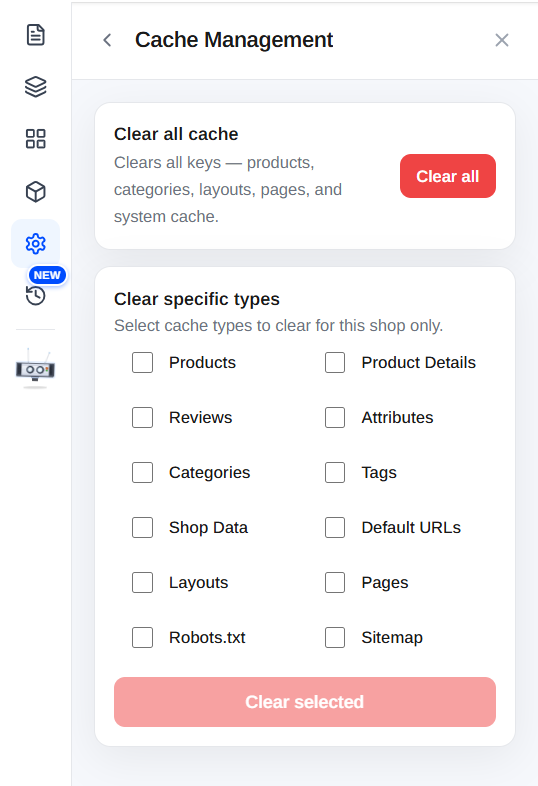
Open the Settings panel from the Builder's left menu, then choose Cache Management to clear your store's cache.
What is caching?
To keep your storefront fast, Orderain stores ready-made copies of your store's data, things like products, categories, layouts, and pages, so it doesn't have to rebuild them on every visit. These copies are called the cache.
Most of the time this is invisible and helpful. But occasionally you'll make a change and the storefront keeps showing the old version. Clearing the cache forces Orderain to fetch fresh data and show your latest changes.
Clear all cache
Click Clear all to wipe every cache key at once, products, categories, layouts, pages, and system cache.
Clear specific types
If you know exactly what changed, you can clear only that cache instead of everything. This is faster and leaves the rest of your store's cache intact.
Select the types to clear
Tick the checkboxes for the cache types you want to clear. Options include:
- Products
- Product Details
- Reviews
- Attributes
- Categories
- Tags
- Shop Data
- Default URLs
- Layouts
- Pages
- Robots.txt
- Sitemap
Clear the selection
Click Clear selected to clear only the ticked types for this shop.
When to clear the cache
Clear the cache when your live store isn't reflecting a change you've already made, for example:
- You updated a product, price, or image but the old one still shows.
- You edited a page or layout and the change isn't visible.
- Your Robots.txt or Sitemap looks out of date.